
SwingersTaboo.com
Add your EVENT
How to add an Event on SwingersTaboo.com

Publishing an event for your business on SwingersTaboo.com is completely free.
It is a powerful way to promote your special nights, parties, offers, and exclusive events, while allowing users to discover them and, when available, manage reservations directly through our website.
To publish an event, you must meet the following requirements:
1. You must have an active listing on our map and directory
Your club, venue, or business must already be published on SwingersTaboo.com.
Click here to learn how to publish your listing.
An exception may be made for virtual events, such as events organized by content creators. In this case, authorization must be requested in advance.
2. Your listing must be active under a Basic or Professional plan
Events can be published only by listings with an active Basic or Professional plan.
The Free 30-Day Trial plan does not allow event publishing.
The Events Directory
Whether you run a club, organize an adult-oriented activity, or manage a resort or hotel offering services for swinging couples, our Events Directory allows you to promote your events with ease.
You can publish an event poster for a single date or for multiple consecutive dates, specify the event type, schedule, participation fees, and add a detailed description with all the information you consider important.
Follow this guide to unlock the full potential of our free event publishing system.
Add an Event (Link Here)
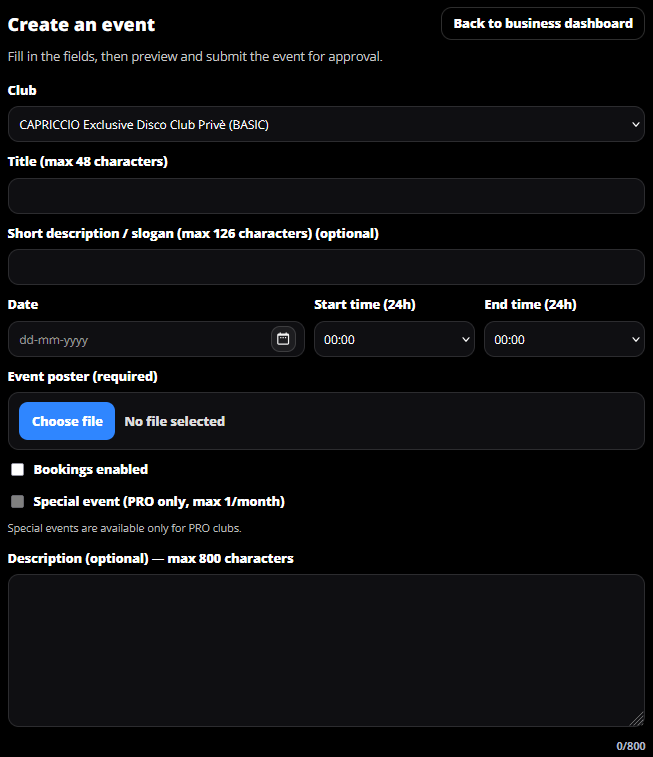
In the first field, select the club for which you want to publish the event. If you only manage one club, it will be selected by default. If you manage multiple clubs, you will be able to choose the correct one.
Enter the event title, up to 48 characters.
Add a slogan or a short description.
Select the event start date, the start time, and the end time. If the event ends after midnight, the end time will automatically refer to the following day. For example: 22:30 – 03:00.
Upload the event poster.
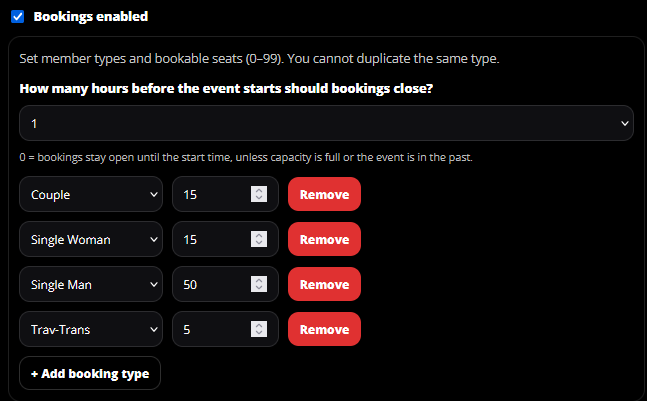
Choose whether to enable bookings for the event. This option will be explained later in the guide.
If you have a Professional profile, you can mark the event as Special and highlight it above all other events. This option is limited to one special event per month.
Finally, enter a more detailed description of the event and the services offered. Then click Preview to see how the event will appear once published, and submit it for approval.
The booking system does not require any advance payment.
Its purpose is to help clubs estimate how many people may attend from the website and to increase event visibility. When a user confirms their participation in an event, their friends list will be notified, helping the event reach a wider audience.
You can choose which types of profiles are allowed to book and define how many places are reserved for each category before availability is marked as full.
You can also decide how many hours before the event bookings should be automatically closed.